Side Project • AI Diagramming

Bhava

Make diagramming instant, clean, and human.

From messy AI outputs to clean, editable diagrams. I built this to solve the friction of "re-drawing" charts generated by LLMs.

Prompt Strategy Trust Signals Pricing & Retention AI Evals
Bhava interface - AI diagramming tool
Role
Founder & Product Designer
Key Outcome
60% Activation & 5% Landing Weeks

Shipped usage-based pricing and tracked retention + MRR weekly.

Reliability Layer

Guided AI diagramming that
feels reliable.

I turned Bhava from a promising hack into a trust-first workspace. The AI shows its work, asks for context, and outputs clean, editable diagrams.

60% Activation

Achieved by pairing prompt presets, progress states, and failure logging with weekly eval loops.

Value Aligned

Removed free mode for usage-based billing. We tracked retention and MRR weekly to ensure pricing matched utility.

The Messy Middle

Process & Iterations

From hacked-together prototypes to a polished product.

Prototype 01

Zero Guidance

The first build was a blank prompt. Users froze. We added suggested prompts, live thinking states, and "show your work" logging.

Pricing Sketch

Credit-Based

Mapped credits per plan to cap abuse. This informed usage-based billing that filtered low-intent signups.

Activation

Guided First Win

Built an onboarding path that asks for system type, generates a diagram with context. Lifted activation to 60%.

What Failed

"Free Forever" tier attracted spam. Switching to "Paid Only" improved quality.

Context

Why we built this

"Every week, I watched designers redraw the same diagram—like déjà vu with arrows."

By day, I'm deep in B2B dashboards. By night, I watch my team waste hours redrawing the same system diagram in Figma, Draw.io, Excalidraw, and Miro.

So I started building Bhava—an AI tool that generates diagrams instantly.

What Bhava looked like before vs after What Bhava looked like before vs after
Live Status: Early Stage

We're 4 weeks post-launch. I handle design, product, and evals.

Users ~2.5k
MRR $300
The problem

Broken workflows, broken trust

🔀

Diagramming was fragmented

  • Engineers used Draw.io
  • Designers used Figma
  • PMs used Miro
  • Same diagram, 4 places, 30+ minutes each time
🤔

AI tools fell short

  • Vague prompts → broken diagrams
  • No feedback while AI "thought" → mistrust
  • Failures with zero explanation

The activation problem: In early tests, only 38% of users created their first diagram. The other 62% bounced without trying.

"AI doesn't need to be perfect—it just needs to show it's trying."

Our bet: Build on top of Draw.io (largest user base) and make AI feel reliable, not random.

Approach

Designing for trust

Every design decision mapped back to a trust framework for AI research

01

Ability

Can the AI actually do the task?

02

Benevolence

Does it feel like it's helping me?

03

Integrity

Is it honest about what it can and can't do?

04

Reliability

Does it work consistently?

Discovery

Understanding the drop-off

Before redesigning anything, I spent 2 weeks analyzing user behavior—watching session recordings, tracking prompts, and interviewing people who churned.

8

User Interviews

Deep dives with designers and PMs who churned within 48 hours

12

Hours of Sessions

Analyzed recordings to identify drop-off patterns and friction points

3

Usability Tests

Live observation of first-time users attempting diagram creation

User Journey: First-Time Experience

👀

Discovery

Lands on homepage via Product Hunt or Twitter

Curious, skeptical

😕

Sign Up

Creates account, sees empty editor

Confused, uncertain

Blank Canvas

Stares at text box with no guidance

Paralyzed, frustrated

Waiting

Hits generate, sees spinner for 7 seconds

Anxious, doubting

👎

Failure Point

Gets poor result or gives up

Disappointed, churns

01

Blank canvas paralysis

Users landed on an empty editor with no guidance, no examples. They froze.

02

Mode confusion

"Intelligent" vs "Basic" results varied wildly. Trust eroded fast.

03

No progress feedback

3–8 seconds of spinner. No updates. Pure anxiety.

04

Hidden export

Only 15% exported their first diagram. The happy path was invisible.

What users told us

I don't know what to type, so I just close the tab.

L
Lisa Martinez
Product Manager

Why does intelligent mode give me different results?

K
Kevin Zhang
UX Designer

It's just spinning... is it even working?

R
Rachel Kim
Engineer

Where do I export this diagram?

D
David Patel
First-time user
"The activation gap is usually a clarity gap—not a capability gap."
Market Context

The Landscape

Understanding how Bhava stacks up against existing diagramming solutions

Draw.io / Diagrams.net

  • Free and open-source
  • Massive feature set (200+ shapes)
  • Manual drag-and-drop workflow
  • Steep learning curve
  • No AI assistance

Lucidchart

  • Professional-grade tool
  • Real-time collaboration
  • Templates library
  • $7.95-$9/user/month
  • Still primarily manual

Miro / FigJam

  • Infinite canvas approach
  • Excellent for brainstorming
  • Team collaboration features
  • Not diagram-focused
  • Overkill for simple diagrams

ChatGPT + Plugins

  • Can generate diagrams via text
  • Outputs often poorly formatted
  • No direct editing capability
  • Multi-step export process
  • Black-box generation

Why Bhava Is Different

Instant Generation

AI-first approach cuts diagram creation time from 30 minutes to 30 seconds

🔍

Trust-First UX

Shows reasoning, progress states, and allows editing—not a black box

📤

True Portability

Export to editable Draw.io, PNG, SVG—works with existing tools

🎯

Guided Experience

Presets and examples eliminate blank canvas paralysis

What I shipped

Six experiments that moved metrics

Each redesign tackled a specific trust or activation gap. Here's what worked.

First we fixed clarity, then trust, then monetisation.

Phase 1: Onboarding & Clarity

Getting users to understand what to do and how to start

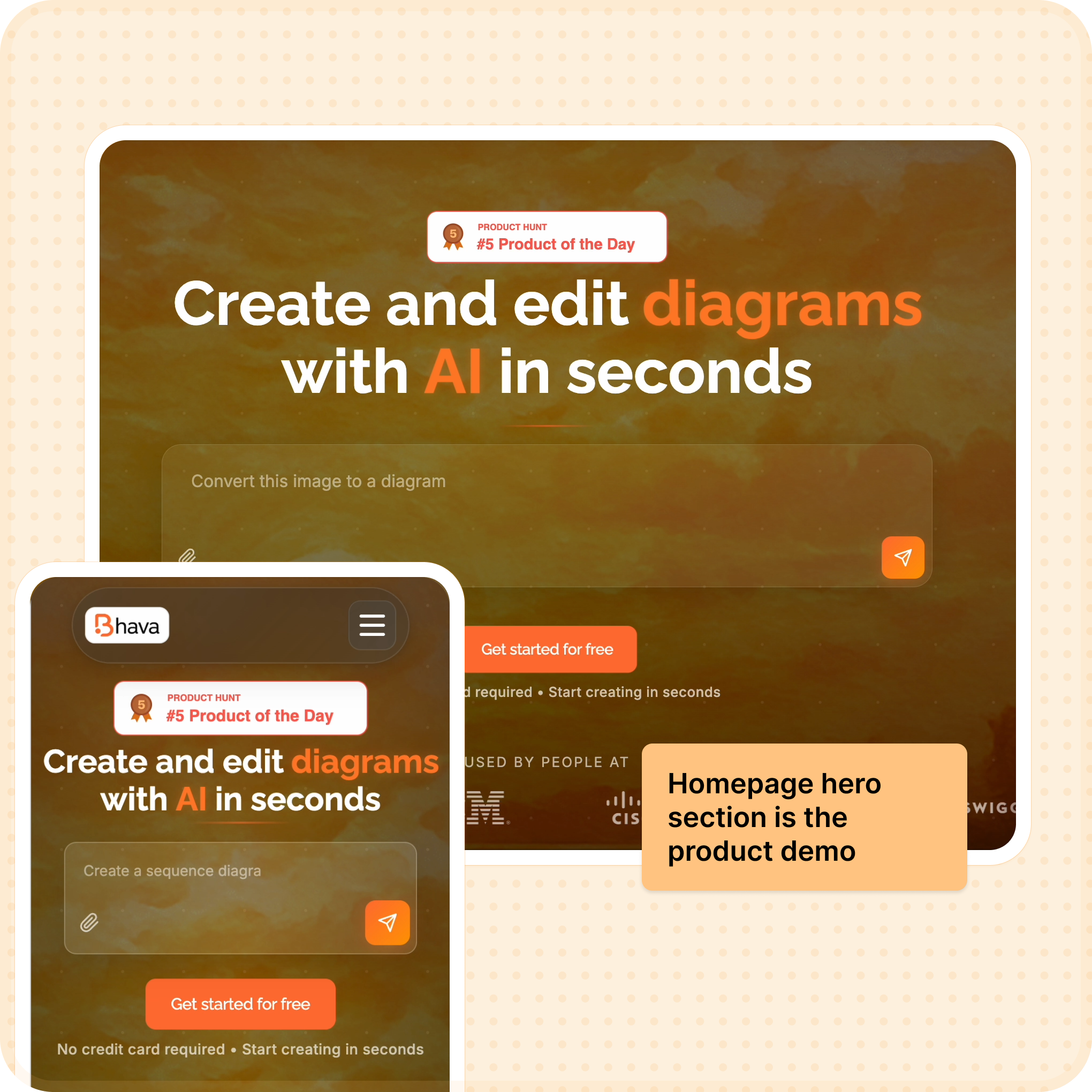
Homepage prompt with guided examples
New homepage prompt: Large interactive demo with example chips showing what users can create (e.g., "User journey map for an e-commerce app"). Visitors can test the product before signing up, lifting landing conversion from 1% → 5%.
Experiment 01

Homepage prompt became the product demo

Problem: Vague CTAs meant visitors signed up without understanding what to type.

Solution: Elevated a giant prompt box with example chips and a mini walkthrough so users preview the experience before creating an account.

Before
  • Generic "Try for free" button
  • No preview of what product does
  • Users signed up blind
  • 1% conversion rate
After
  • Interactive prompt with examples
  • Live demo before sign-up
  • Users understand value upfront
  • 5% conversion rate (+4pp)
1% → 5% Landing conversion (+4pp)
45s → 12s Time-to-first-prompt
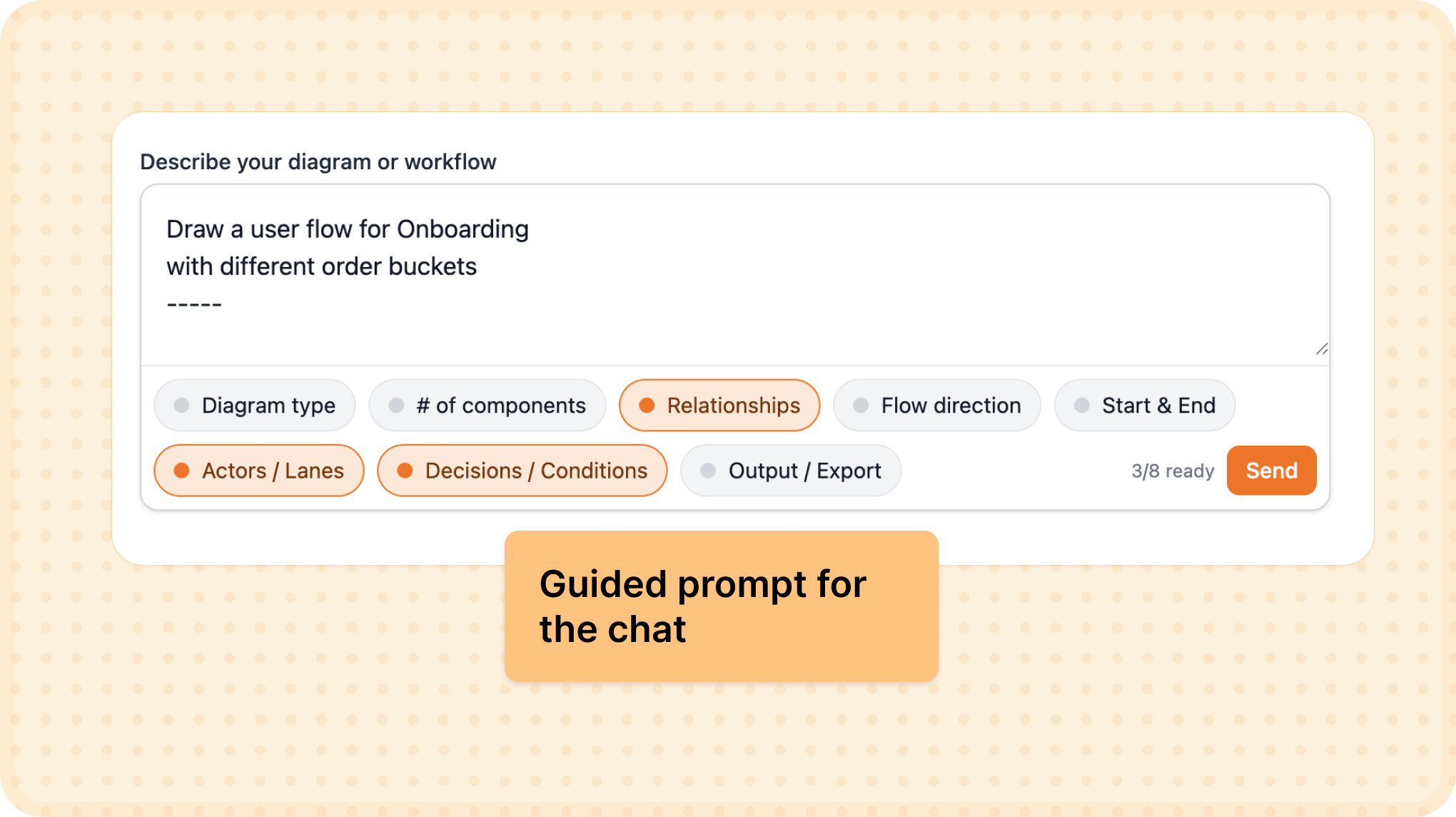
Guided onboarding cards
Guided onboarding experience: Diagram-type cards (Flowchart, System Architecture, User Journey) with contextual hints and 3-step progress indicator. This structure eliminated blank canvas paralysis, boosting activation from 38% → 60%.
Experiment 02

Guided prompt experience replaced the blank chat

Problem: New users froze on an empty chat and churned without generating anything.

Solution: Added diagram-type cards, contextual hints, and a three-step progress indicator that nudges people into action.

Before
  • Empty text box, no guidance
  • Users didn't know what to type
  • No indication of capabilities
  • 38% activation rate
After
  • Diagram-type selector cards
  • Contextual prompt hints
  • 3-step progress indicator
  • 60% activation rate (+22pp)
38% → 60% Activation (+22pp)
+18% Prompt quality scores
"Clarity unlocks activation. But trust keeps users coming back."

Phase 2: Trust & Quality

Building reliability into the product experience

Premium generation screen
Premium-only experience: Removed the inconsistent "Basic" mode and offered one high-quality premium generation for free trials. This bold move cut "bad diagrams" support tickets by 55% and stabilized Day-7 retention at 30%.
Experiment 03

Removing free mode protected trust

Problem: The legacy "Basic" mode produced low-quality diagrams that tanked perceived reliability.

Solution: Sunset the free mode, offered one premium try, and introduced usage-gated access to keep output quality consistent.

30% Day-7 retention (stabilized)
−55% "Bad diagrams" support tickets
"Monetisation isn't just about pricing—it's about signalling reliability."

Phase 3: Pricing & Evaluation

Aligning value with sustainable monetisation

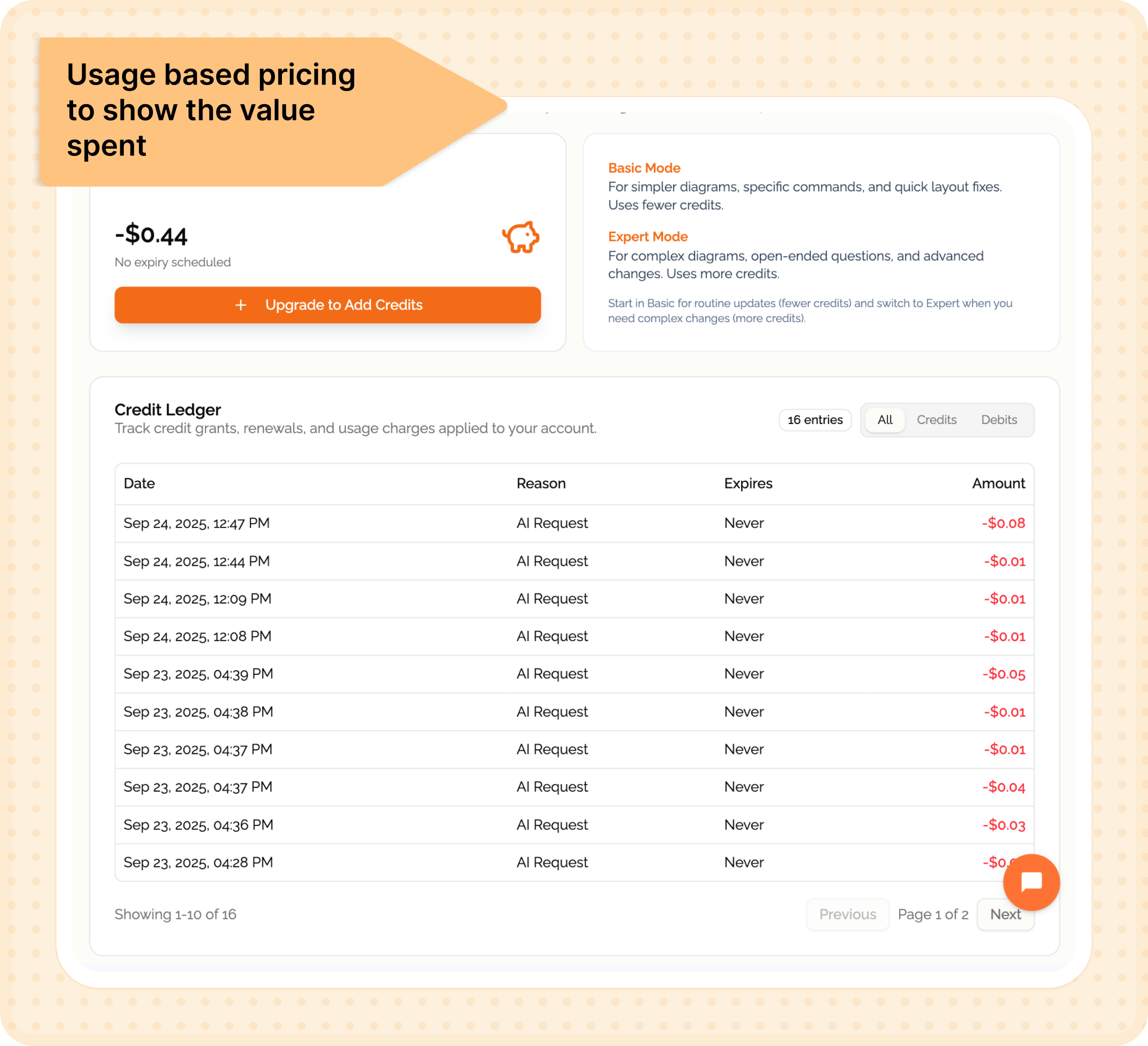
Usage-based pricing screen
Usage-based pricing model: $10 base plan with transparent credit packs and real-time usage tracking. Turned unprofitable unlimited plans into sustainable revenue, flipping contribution margin from -22% to +14%.
Experiment 04

Usage-based pricing matched value to spend

Problem: Unlimited $10/month plans were unprofitable and encouraged abuse.

Solution: Swapped to a $10 base plan with transparent credit packs and real-time usage tracking.

$30 First enterprise add-on purchase
−22% → +14% Contribution margin flip
Usage dashboard
Usage dashboard: Always-available tutorial and transparent usage tracking showing credits, generation modes, and expiry dates. Reduced billing-related support questions by 60% and improved NPS on transparency by 1.2 points.
Experiment 05

Usage clarity reduced support debt

Problem: Pricing changes created confusion-users couldn't tell where credits went.

Solution: Built an always-available tutorial and a usage dashboard detailing credits, modes, and expiry.

−60% Billing questions
+1.2 pts NPS on transparency
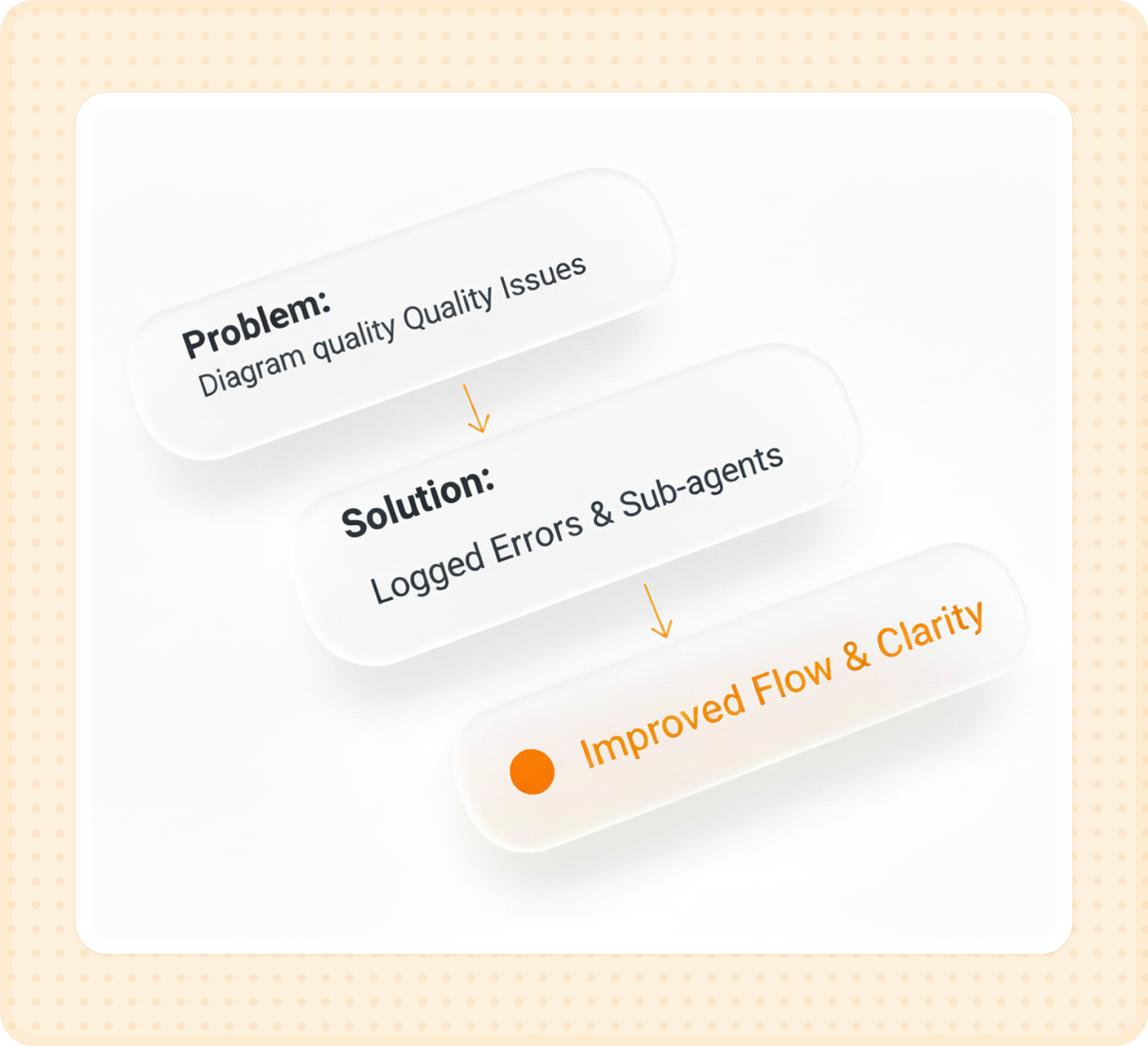
Manual evaluation log
Manual evaluation process: Logged ~100 failed diagram generations, clustered error patterns by diagram type, and routed high-volume types (flowcharts, system diagrams) through specialized sub-agents. Improved flowchart success rate by 70% while keeping costs flat through prompt caching.
Experiment 06

Manual evals powered sub-agent quality

Problem: Diagram quality varied by type and we lacked clarity on failure patterns.

Solution: Logged ~100 failed diagrams, clustered errors, and routed high-volume types through specialized sub-agents.

+70% Flowchart success rate
Flat Costs (thanks to caching)
4 weeks post-launch

Current metrics

A snapshot of where things stand after the first month of shipping.

Activation Rate
38% 60%
+22 points ↑

Guided onboarding was the key driver for new signups.

Landing Conversion
1% 5%
+4 points ↑

Interactive prompt demos helped visitors understand the value faster.

Gen Speed
7.8s 3.2s
59% Faster

Prompt caching reduced median generation time significantly.

Cost Efficiency
.08 .048
40% Reduction

Per-diagram cost optimization via Claude API caching.

Monthly Revenue
$200
First Baseline

MRR from 30 initial customers on usage-based pricing.

Retention
30%
Day-7 Stabilized

Users returning to create another diagram within the first week.

"I learned that AI trust is built in microseconds—even a 7-second latency feels fine only when users see progress."

01

Trust compounds, but so does mistrust

One broken diagram erodes more trust than five perfect ones build. Quality consistency matters more than feature breadth in AI products.

02

Monetisation signals reliability

Charging more increased trust because it signaled we stood behind the quality. Usage-based pricing tells users the output is valuable enough to meter.

03

Progress indicators are trust multipliers

Transparency about what's happening builds confidence. Generation time feels different when users see specific steps like "Analyzing structure..."

04

The activation gap is usually a clarity gap

Jump from 38% to 60% activation was about making the product clearer. When users see examples, they immediately understand the possibility space.

What's next

Future bets

Shipping Soon

Near-term priorities

  • "Explain this diagram" overlays
  • One-click export (PNG, SVG, PDF)
  • Diagram versioning
Exploring

Under investigation

  • Team collaboration (workspaces)
  • API access (10 inbound reqs)
  • Template starter packs
Said No To

Deprioritized

  • Custom branding (low demand)
  • Slack/Notion (unclear ROI)
  • White-label (pre-$2K MRR)
Honesty

Risks I'm owning

⚠️

Four weeks is too early to claim PMF.

⚠️

Need day-30 and day-60 retention metrics.

⚠️

Export rate stuck at 15%—my next focus.

⚠️

Eval rubric is still subjective (v1).

⚠️

Metrics estimated; refining instrumentation.

⚠️

Pricing tests ongoing; willingness forming.